Getting the most out of Clarity Space® starts with taking a few minutes to make sure your profile and class information are complete and accurate. A little time spent setting up your account now can make it easier to stay organized, find important information, and get the most from the tools available to you throughout the school year.
Your classes are at the center of your academic organization in Clarity Space®, so keeping this information up to date is an important first step.
Step 1: Review Your Classes
From the main menu, select Classes.
Take a moment to review your class list and make sure all of your current classes are showing correctly. If you’ve recently added or dropped a class, or your schedule has changed, this is a good time to make sure Clarity Space® reflects your current schedule.
Having the correct classes in your account helps ensure that your academic information is organized in the right place.
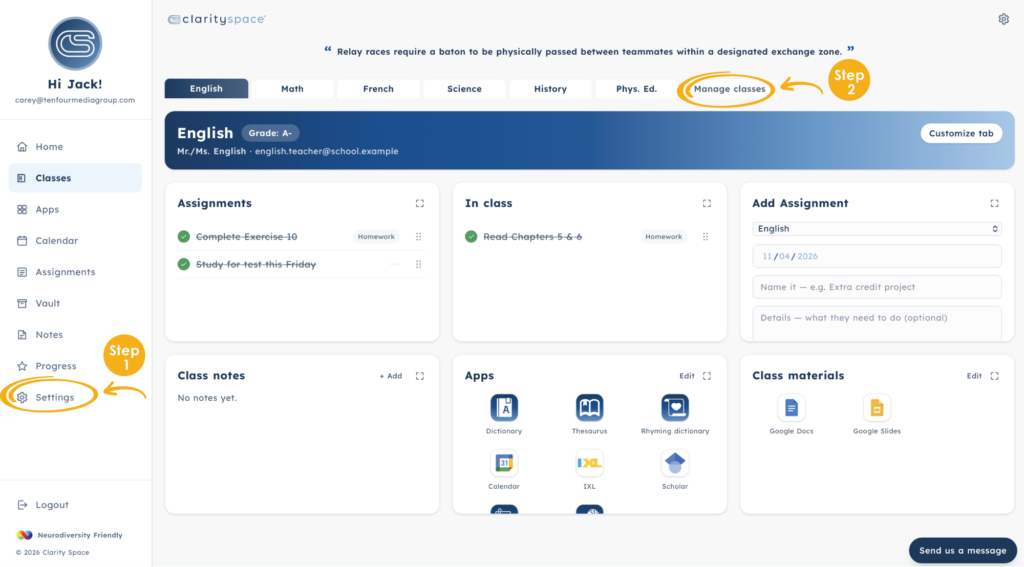
Step 2: Manage Your Classes
At the top of the Classes page, select Manage Classes.
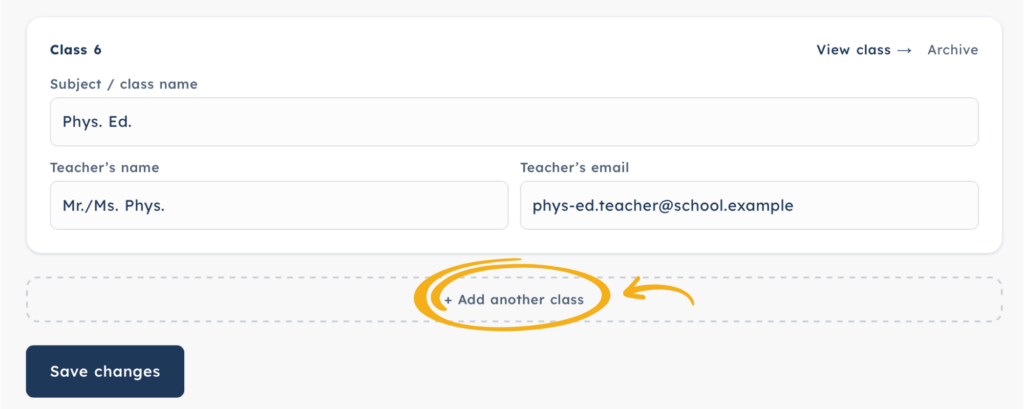
Review each class individually and make sure the information listed is complete and accurate. In particular, check that the subject, teacher’s name and email address are included for each class.
Keeping your teacher information up to date can make it much easier to quickly find important contact information when you need it. It also helps Clarity Space® provide a more complete and organized view of your academic life.
Take a few extra minutes to review each class rather than simply checking that the class name is correct. The more complete your information is, the more useful your Clarity Space® experience can be.

If you’re missing a subject, you can easily add it by scrolling to the bottom of the section and entering it in the “Add Another Subject” field. Once you’ve made your changes, be sure to click Save so your updated information is saved and nothing is lost.
A Few Minutes Now Can Make School Easier Later
Setting up your profile and classes may seem like a small step, but having accurate information in one place can make a big difference when you’re trying to stay on top of school.
Instead of searching through different platforms or trying to remember where you saved important information, Clarity Space® is designed to give you a convenient place to organize the details that matter most.
Once your profile and class information are complete, you’re ready to explore everything Clarity Space® has to offer—from organizing assignments and keeping track of what’s coming up to quickly accessing important class and teacher information.
Take a few minutes to set up your Clarity Space® account today, and start the school year with a clearer path forward.
One calm place for everything school.